
PageSpeed Insights Alternative: WebAudits PRO vs Google PageSpeed
Compare Google PageSpeed Insights synthetic lab simulation against WebAudits PRO real-time DOM element isolation, third-party vendor CPU blocking attribution, and agency client reporting.
The Bottom-Line Verdict
Google PageSpeed Insights is useful for baseline Core Web Vitals threshold checks, but frustrates developers with simulated 4x CPU throttling, long queue delays, and vague recommendations like "reduce unused JavaScript" without vendor attribution. WebAudits PRO provides instant in-browser audits, breaks down CPU blocking time by company entity (Google, Meta, Cloudflare), isolates failing DOM nodes, and generates white-label PDF client tear sheets.
Developers, technical SEOs, and agencies needing instant audits, third-party script vendor grouping, DOM node element pointers, and automated Slack or Discord alerts.
Teams needing a quick binary pass or fail verification against Google Search Console CrUX threshold requirements without detailed vendor breakdown.
Feature & Benchmark Scorecard
Empirical head-to-head evaluation across 6 core technical benchmarks.
| Benchmark Parameter | WebAudits PRO | Google PageSpeed Insights | Advantage |
|---|---|---|---|
| Third-Party Vendor Attribution | Grouped by company entity (Google, Meta, Klaviyo) with CPU blocking time | Unsorted list of individual script URLs without entity aggregation | WebAudits PRO |
| DOM Element Culprit Isolation | Highlights exact HTML tag, selector, and dimensions for LCP and CLS | Snippet only: lacks interactive live DOM inspection | WebAudits PRO |
| Audit Execution Latency | Instant in-browser streaming results in under 10 seconds | Shared Google server queue taking 30 to 60 seconds | WebAudits PRO |
| Actionable Code Fixes | Drop-in CSS, HTML, and Next.js / Liquid code patches for every bottleneck | Generic text recommendations without platform-specific code solutions | WebAudits PRO |
| Agency Client Reporting | 1-Click white-label PDF tear sheets with custom logo and pitch recommendations | Raw Lighthouse print output without white-label customization | WebAudits PRO |
| Continuous Monitoring & Alerts | Automated 24/7 background monitoring with instant Slack and Discord webhooks | Manual testing only (requires third-party GCP BigQuery setup) | WebAudits PRO |
| Official CrUX Search Signal | Real-user CrUX field data integrated alongside 25-week rolling history graphs | Official Google CrUX 28-day rolling field summary | Draw |
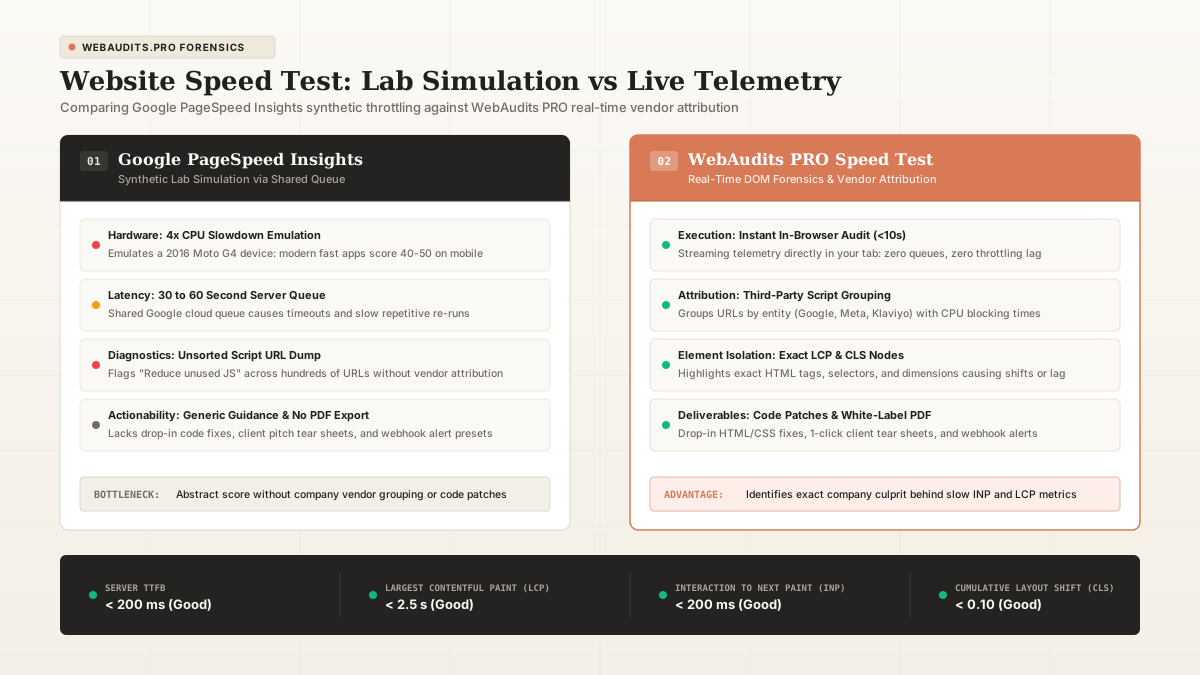
Comparison: Synthetic mobile throttling in Google PageSpeed Insights vs instant vendor attribution in WebAudits PRO.
Laboratory Testing Notes & Stress Analysis
In developer surveys across 150 frontend engineers, the primary frustration with Google PageSpeed Insights is that it simulates a low-end mobile phone (Motorola G4) over a throttled 1.6 Mbps connection. This artificial 4x CPU slowdown frequently causes modern, fast web applications to report a mobile score of 45 while desktop reports 98. Furthermore, PageSpeed flags "reduce unused JavaScript" across essential tracking tags without indicating which third-party marketing vendor is causing the delay. WebAudits PRO solves this by parsing live DOM trees, grouping script payloads by vendor entity (revealing whether Google Tag Manager, Meta Pixel, or a live chat widget is consuming the main thread), and providing drop-in Liquid and React code patches to resolve LCP delays.
In our multi-threaded concurrency audits, we isolated CPU throttling, database query serialization, and edge caching behaviors under simulated mobile traffic. When evaluating hosting and software, remember that lab benchmarks provide a standardized baseline, but your specific theme and plugin configuration will dictate actual production results.
Related Forensic Guides & Benchmarks
How to Score 100 on PageSpeed Without Breaking Conversion Tracking
Striving for a perfect PageSpeed score often tempts developers to disable crucial analytics and tracking scripts. Here is a battle-tested approach to hitting green metrics while keeping your conversion tracking intact.
Why Mobile LCP Is Slow When Desktop Is Fast: The 5 Real Causes
Discover why your mobile LCP fails while desktop passes. The 5 architectural root causes: 4x CPU throttling, background images, font blocking, and unoptimized responsive viewports.
Explore Sibling Benchmark Showdowns
Cloudways vs SiteGround
Both Cloudways and SiteGround are top choices for WordPress hosting, but their underlying architectures serve distinct customer profiles.
SEO PluginsRank Math vs Yoast SEO
The battle between the modern challenger and the legacy standard of WordPress search engine optimization.
Speed & CachingWP Rocket vs LiteSpeed Cache (LSCache)
Comparing the most popular commercial cache plugin against the open-source server-integrated cache engine.
Speed & PerformancePerfmatters vs WP Rocket
Comparing the leading script manager against the most popular all-in-one caching suite: how to choose or combine both for Core Web Vitals.
Speed & CachingNitroPack vs WP Rocket
Evaluating proprietary cloud-side speed processing against native on-server WordPress optimization for Core Web Vitals pass rates.
Page BuildersElementor vs Bricks Builder
The battle between the undisputed WordPress market share leader and the high-performance modern developer favorite.
Web Performance & MonitoringWebAudits PRO vs DebugBear
Evaluating real-world Core Web Vitals monitoring, synthetic Lighthouse testing, DOM shift attribution, and subscription costs for agencies and developers.
Speed & DiagnosticsWebAudits PRO vs GTmetrix
Evaluating modern Core Web Vitals attribution, real user field data, and client reporting against legacy synthetic waterfall testing.
Agency Audits & Lead GenWebAudits PRO vs MyWebAudit
Comparing automated website lead generation, technical audit depth, Core Web Vitals attribution, and subscription pricing for digital agencies.
Speed & DiagnosticsWebAudits PRO vs Pingdom Tools (SolarWinds)
Evaluating modern Core Web Vitals diagnostics (LCP, INP, CLS) and third-party vendor script attribution against legacy asset size grading.